What is it?
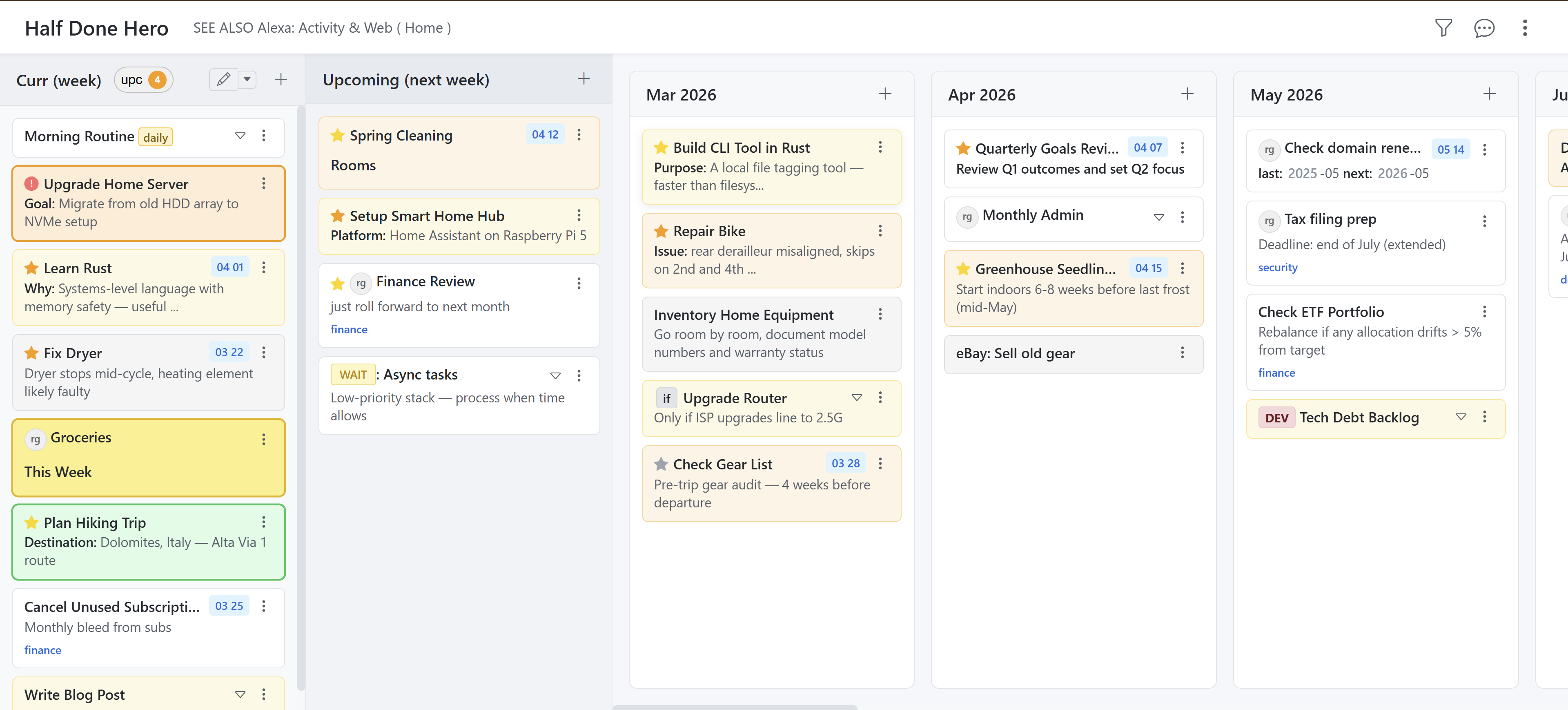
AI Task Board is a time-based task board. Instead of a list that only ever grows, every task has its place in time: Current and Upcoming for what is due now, and behind them a continuous timeline of months, weeks and days reaching into future years. Drag a task where it belongs – or tell the AI agent what should happen.
- An AI agent with its own tools that really performs the task management – it doesn't just phrase suggestions
- Every change is shown in colour and accepted or rejected individually or all at once
- A timeline instead of a list: Current, Upcoming, months, weeks, days, following years
- Automatic archiving at month turn; overdue tasks move themselves to where they belong
- Data as YAML files on your own machine – no third-party service in between
Features
AI agent
Knows the whole board and creates, edits, deletes and moves – with tools for large rearrangements too.
Timeline
Month, week and day as their own columns – every following period up to the coming years in a single view.
Keeps itself tidy
Finished tasks move into the archive at month turn, overdue ones into the right month – without you touching it.
Tags & grouped view
Hierarchical tags written straight into the text; the grouped view turns them into columns with sub-sections.
Full-text search
Ctrl+K searches the entire board – name, description and tags, sub-tasks included.
Rich tasks
Priority, due date, estimated duration, sub-tasks, attachments and a description with its own syntax.
How it works
- You write what you need into the AI sidebar – in plain language
- The agent reads the entire board and picks its tools
- Every change appears as a coloured overlay right on the cards
- Flow: your request → agent → proposal → your approval
Good to know
The agent proposes, it never acts behind your back. Created cards show up green, edited ones blue, deleted ones red, moved ones orange – accept each one on its own or discard everything at once.
The model is yours to choose: OpenRouter for the major providers, Gemini – or Ollama locally on your own machine, in which case not a single task ever leaves the building.
What does it cost?
Fixed-price setup · plus running usage costs (AI model/APIs, if AI is used). The price depends on how far the board is adapted to the way you work and has to be assessed individually.
Can the agent mess up my board?
No. It changes nothing directly – it proposes every creation, edit, deletion and move. The proposals sit as coloured overlays on the board and only take effect once you accept them, one by one or all together.
Do I have to use AI?
No. The board works entirely by hand: create tasks, drag them around, search, group. The AI agent is an optional addition you can switch on.
Which AI model is used?
That is configurable: OpenRouter (access to practically every common model), Google Gemini, or Ollama for a model running locally on your own hardware.
Where does my data live?
In readable YAML files on your own machine or server – per user, with a separate archive per month. Without AI your tasks never leave the building; with AI, whatever the agent needs as context goes to the chosen model – and with a local model, nothing goes anywhere.
The AI agent
Most task managers with “AI” suggest text. Here the agent works on the board itself. It receives your tasks as context and has several tools with which it does the actual management work – including the kind you would otherwise spend half an hour clicking through:
- Create, edit, delete and move individual tasks and sub-tasks
- Tools for large rearrangements – clean up the whole calendar, or redistribute an overloaded month
- Replanning on your terms: “everything from this week that isn't urgent goes to next month”
- Proposal mode: every change marked in colour – green created, blue edited, red deleted, orange moved
- Approval stays with you: accept one, reject one, or apply everything in a single click
Why this is the difference: an assistant that only answers just moves the work around. An agent with tools gets it done – and because nothing takes effect without your confirmation, you give up no control in exchange.
Who it fits
Freelancers & management
Keep many parallel commitments across months in view without constantly re-sorting them.
Project planning
Milestones on the timeline, sub-tasks per step, replanning by simply telling the agent.
Day planning
The current column as a plain list, as named time blocks, or as an hour grid with pinned appointments.
Recurring work
Regular tasks with their own badges, plus automatic archiving of everything already done.
The board in detail
- Current column in three modes: a plain list, named time blocks (morning, afternoon …) or a day calendar with an hour grid
- Task card: date and time badge, priority icon, recurrence badge and waiting state – always the most important one first
- Task dialog with tabs for description, attachments and sub-tasks; the description itself can be split into tabs of its own
- Description syntax: markdown, checklists, foldable sections, links to other tasks, reusable text blocks
- Tags in the text:
#project/partwritten into the description becomes a tag – no second field to maintain - Selection mode: colour tasks orange, yellow or green in one click to group them ad hoc
Tailored to the way you work
AI Task Board is not a rigid off-the-shelf tool – it is set up around your routine. Adaptable parts include:
- AI provider and model – from the cloud to a local model with no internet at all
- The agent's tools: what it may do, and what it explicitly may not
- Time blocks and calendar grid to match your working day
- Your own text syntax for badges, highlights and markers
- Time zone, urgency thresholds and display modes per user
Architecture & control: backend in PHP 8+, frontend as lean vanilla JavaScript with the Fetch API – no heavyweight frameworks. Tasks, archive and settings live as YAML files per user, so they stay readable, versionable and exportable at any time. The application runs on your own machine or server; with a local model the agent works fully offline as well.
Tech stack
PHP • YAML • Vanilla JavaScript • Fetch API • Drag & Drop API • AI / LLM • OpenRouter • Ollama • Gemini
See it in action
I'm happy to show you the AI Task Board live – ideally on a plan that is actually keeping you busy right now.
Request a demoAt a glance
More than a task board: AI Task Board is an example of my apps that work and of automation – applications where an agent takes the work over instead of merely commenting on it.
AI Task Board for your planning
First conversation free – on site in Bamberg/Nuremberg or online.