What is it?
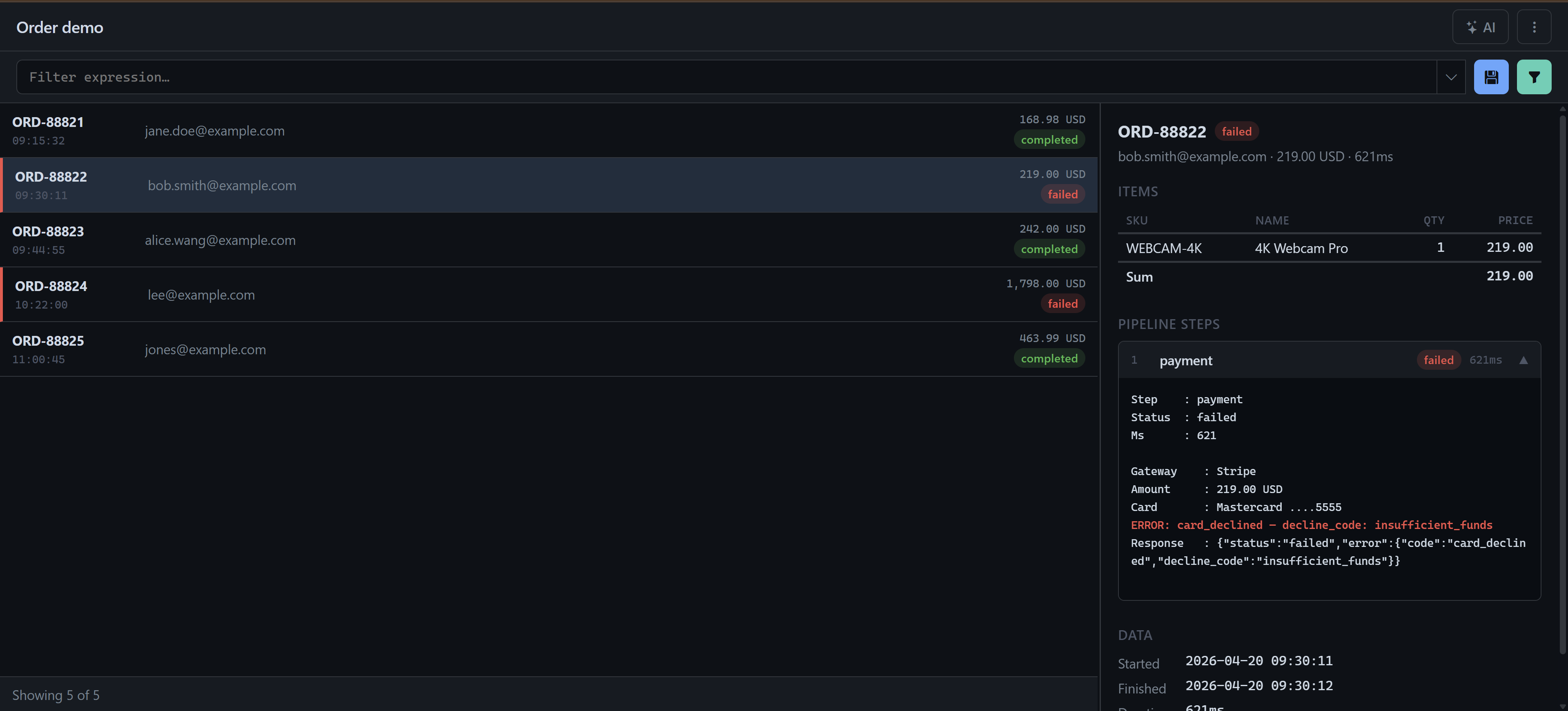
AI Log Viewer is a universal log viewer that brings all your log files into one place – regardless of format. Instead of grepping through raw text files, you see your entries cleanly laid out in a list, open any entry with rich detail and filter with an expressive syntax. An AI handles the heavy lifting: it analyses large logs, spots anomalies and turns a plain question into a filter expression.
- Any format – including multi-line, custom formats that need dedicated parser logic
- Pluggable: a new log type is just a parser plus a renderer – no changes to the main code
- AI analysis and AI-generated filters straight from the interface
- SQLite with zero setup – or MySQL for logs with 100,000+ entries
Features
AI analysis
Send any log to an AI assistant – for analysis, anomaly detection and generated filter expressions.
Large files
Logs with more than 100,000 entries via background ingestion into SQLite or MySQL.
Multi-source merge
Combine multiple files or entire folder trees into a single, unified log view.
Powerful filters
Expression-based with field comparisons, contains, in [...], regex and boolean logic – filters saved per log.
Detail panel
Type-specific layouts with tables, collapsible pipeline steps and highlighted error lines.
How it works
- You point the viewer at a file, a folder or an entire folder tree
- The matching parser decodes the format, a renderer lays the entries out
- You filter, range-select, copy – or ask the AI
- Pipeline: type → parser → renderer → list & detail
Good to know
The log type is detected automatically and can be overridden explicitly via a URL parameter. Each type ships its own renderers for list, mobile and detail – so every log looks the way it reads best.
For small logs, SQLite with zero setup is enough. For larger, a background ingest keeps MySQL continuously up to date – even logs with six-figure line counts stay fluid to search.
What does it cost?
Fixed-price setup · plus ongoing usage costs (AI model/APIs, if AI is used). The price depends on your log formats and scope and needs to be assessed individually.
Does it work with my log format?
Yes. For a custom format, a parser and renderer are added – without changing the main code. Multi-line and folder-based formats (one entry per file or subfolder) are supported too.
How large can the logs be?
For smaller logs, SQLite with zero setup is enough. For very large logs (100,000+ entries) a background worker keeps ingesting the data into MySQL so the view stays fluid.
Do I need AI?
No. Filtering, navigation and the detail views work entirely without AI. The AI analysis and AI-generated filters are an optional add-on.
Where does my data run?
The application runs on your own machine or server. Without AI your logs never leave your premises; with AI, only what you release for analysis is sent to the chosen model.
What for?
Engineers & DevOps
Point the viewer at any log file or folder and immediately filter, navigate and analyse.
Trading systems
Keep order records in view with BUY/SELL badges, status pills and latency highlighting.
Batch jobs
One run per file with a header block and timestamps – colour-coded pass/fail border.
Error logs
PHP error logs with grouped stack traces and colour-coded severity pills.
Built-in log types
- TradingLog: pipe-delimited order records with BUY/SELL badges, status pills and latency highlighting
- BatchJobLog: one file per job run with a header block and timestamped lines; colour-coded pass/fail border
- OrderPipeline: one subfolder per order with summary JSON and numbered step files; collapsible steps that auto-expand on failure
- PhpErrorLog: standard PHP error log with grouped stack traces and colour-coded severity pills
Tailored to your logs
AI Log Viewer is not a rigid off-the-shelf tool but modular, and it is tuned to your log formats and your workflow. Every building block is swappable:
- A custom log type for your format – a parser and renderer are enough
- Storage of your choice: SQLite with zero setup or MySQL for very large logs
- Predefined logs and sources per user and per organisation
- Configurable AI backend – for analysis and filter generation
- Light and dark UI themes
Architecture & control: backend in PHP 8+ with a pluggable type → parser → renderer pipeline; frontend as lean vanilla JavaScript with the Fetch API, no heavy frameworks. Settings, saved filters and type overrides live per user and per organisation – the application runs on your own machine or server.
Tech stack
PHP • SQLite • MySQL • YAML • Vanilla JavaScript • Fetch API • AI / LLM
See it in action
I’m happy to show you AI Log Viewer live on sample logs – or directly on your own log files.
Request a demoAt a glance
More than a log viewer: AI Log Viewer is an example of my AI data solutions and automation – tailored tools that turn raw data into usable insight.
AI Log Viewer for your logs
First call is free – on site in Bamberg/Nuremberg or online.