Hauptfunktionen
- KI-Analyse: Senden Sie jedes Log an einen KI-Assistenten für automatisierte Analyse, Anomalieerkennung und KI-generierte Filterausdrücke
- Modulares Typsystem: Unterstützen Sie neue Log-Formate, indem Sie einfach einen Parser und Renderer hinzufügen – ohne Änderungen an der Hauptanwendung
- Unterstützung großer Dateien: Verarbeitet Logs mit mehr als 100.000 Einträgen durch Hintergrund-Import in SQLite oder MySQL
- Zusammenführung mehrerer Quellen: Kombinieren Sie mehrere Dateien oder ganze Ordnerbäume zu einer einzigen, einheitlichen Log-Ansicht
- Umfangreiche Filtersyntax: Ausdrucksbasiertes Filtern mit Feldvergleichen,
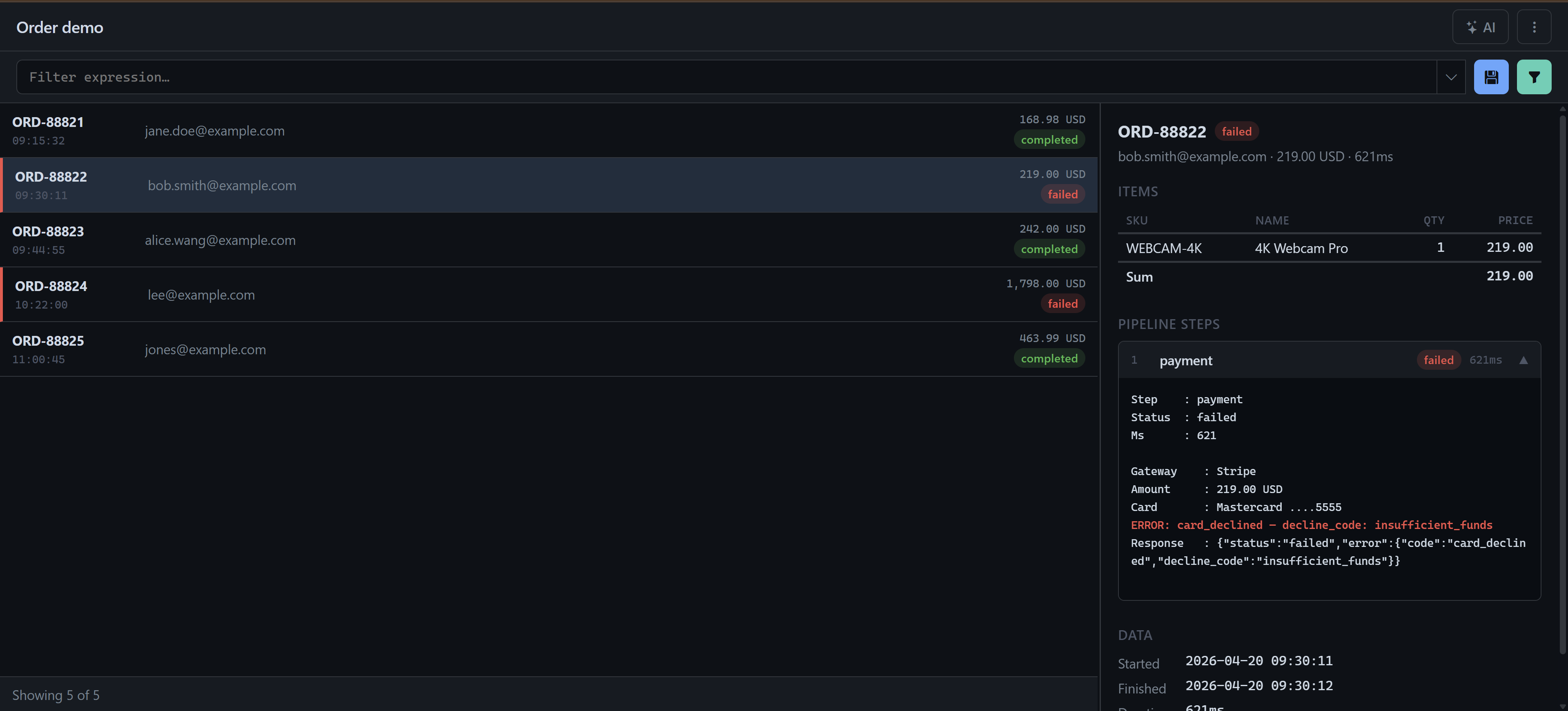
contains,in [...], Regex und boolescher Logik; Filter werden pro Log gespeichert - Detailbereich: Typspezifische, umfangreiche Layouts mit Tabellen, einklappbaren Pipeline-Schritten und hervorgehobenen Fehlerzeilen
- Mehrfachauswahl & Kopieren: Wählen Sie Einträge bereichsweise per Tastenkürzel aus, kopieren Sie sie in die Zwischenablage und nutzen Sie das Kontextmenü
- Designs: Helle und dunkle Oberflächendesigns
Technische Architektur
- Backend: PHP 8+ mit einer modularen Pipeline aus Typ → Parser → Renderer
- Speicherung: SQLite (ohne Einrichtung) oder MySQL; ein Hintergrund-Import-Worker hält die Datenbank kontinuierlich aktuell
- Typerkennung: Automatische Erkennung des Log-Typs mit optionaler Überschreibung per URL-Parameter
- Frontend: Vanilla JavaScript mit Fetch API – ohne schwergewichtige Frameworks
- KI-Integration: Konfigurierbares LLM-Backend für Log-Analyse und Filtergenerierung
- Mandantenfähig: Einstellungen pro Benutzer und pro Organisation, gespeicherte Filter und benutzerdefinierte Typ-Überschreibungen
Tech-Stack
PHP • SQLite • MySQL • YAML • Vanilla JavaScript • Fetch API • AI / LLM
Integrierte Log-Typen
- TradingLog: Pipe-getrennte Orderdatensätze mit BUY/SELL-Badges, Status-Pills und Latenz-Hervorhebung
- BatchJobLog: Eine Datei pro Job-Lauf mit Kopfblock und mit Zeitstempeln versehenen Zeilen; farblich codierter Erfolg/Fehler-Rand
- OrderPipeline: Ein Unterordner pro Order mit Zusammenfassungs-JSON und nummerierten Schrittdateien; einklappbare Schritte mit automatischem Aufklappen bei Fehlern
- PhpErrorLog: Standard-PHP-Fehlerlog mit gruppierten Stack-Traces und farblich codierten Schweregrad-Pills
Anwendungsfälle
Entwickler und DevOps-Teams können den Viewer auf jede beliebige Logdatei oder jeden Ordner richten – Trading-Systeme, Batch-Jobs, Order-Pipelines, PHP-Fehler – und Einträge sofort filtern, durchsuchen und analysieren. Der KI-Assistent übernimmt die Schwerarbeit: „Zeige mir alle abgelehnten Orders mit einer Latenz über 100 ms" erzeugt den Filterausdruck automatisch.